
How to choose a replacement laptop charger
A laptop charger gets lost, stops working, or you want a second one for travel. When choosing a replacement, though, you need to be careful, because the wrong adapter will not charge the laptop or may even damage it. Let us explain what to look at.
Most important: voltage and power must match
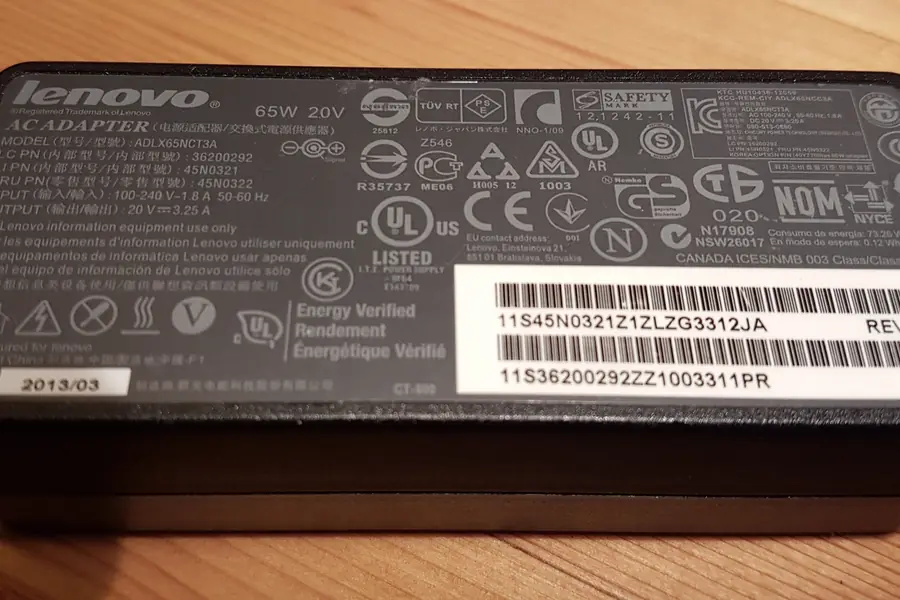
This is crucial. Every laptop needs an exact voltage (volts) and sufficient power (watts). You find these details on the original charger or the laptop’s label.
- The voltage must match exactly. A different voltage will not charge the laptop or may damage it.
- The power (watts) must be at least as high as the original, or higher. A weaker charger cannot keep up with charging the laptop, or overheats.
How to read the label
The label usually shows the voltage in volts (for example 19 V) and the current in amperes (for example 3.42 A). You get the power in watts by a simple multiplication: volts x amperes = watts (19 x 3.42 is roughly 65 W). So if the original charger was 65 W, the replacement should be 65 W or more. Higher power will not harm the laptop; it only ever draws as much as it needs.
The right connector
The charger must also have the right connector that fits the laptop. Connectors differ in shape and size, so check that it fits. On older laptops it is the classic barrel connector, of which there are several sizes.
USB-C chargers
Modern laptops are increasingly charged via USB-C with Power Delivery, just like phones. Here the rule is that the charger must provide enough watts for your model (often 65 to 100 W). The advantage is that one quality USB-C charger can charge both a laptop and a phone. More in the article on USB connectors.
GaN chargers
Newer chargers use GaN (gallium nitride) technology instead of classic silicon. In practice this means that at the same power they are smaller, lighter and heat up less. One compact GaN charger with several USB-C ports thus replaces a heavy original adapter and the phone charger. On the move this saves a lot of space. With GaN too, the rule is that it must provide enough watts for your laptop.
Universal chargers
A universal charger comes in handy if you have several devices or cannot get the exact type. It is either a USB-C charger with Power Delivery, which negotiates the power with the device automatically, or an adapter with interchangeable tips and a choice of voltage. With the second type, pay close attention to the correct voltage; the wrong setting can damage the laptop.
Original versus non-original
- An original charger from the manufacturer is the safest choice.
- A quality branded replacement is fine if it matches exactly in voltage, power and connector.
- Cheap unbranded adapters are a risk, they may have poor protection, overheat and damage the battery or laptop.
What to watch out for
- Always compare the voltage, power and connector with the original charger.
- With USB-C, check Power Delivery support and sufficient power.
- Do not save at the expense of safety, a poor adapter does not pay off.
We'll supply the right laptop charger
We advise on choosing a replacement charger by voltage, power and connector, and supply a proven one. For homes and businesses in the Liptov region.
Get the right chargerIf your battery is also weakening, the article how to extend battery runtime helps.
This article is part of our Hardware and components overview.
Frequently asked questions
How do I find the right charger power for my laptop?
Can I charge a laptop over USB-C?
What is a GaN charger?
Can a higher-power charger damage a laptop?
Does the connector need to match exactly?
Is a universal charger worth it?
Need help with IT?
We will take care of your computers, networks and security - for businesses and households in the Liptov region.
Contact us