
Fifteen years in the workshop: what really breaks in computers
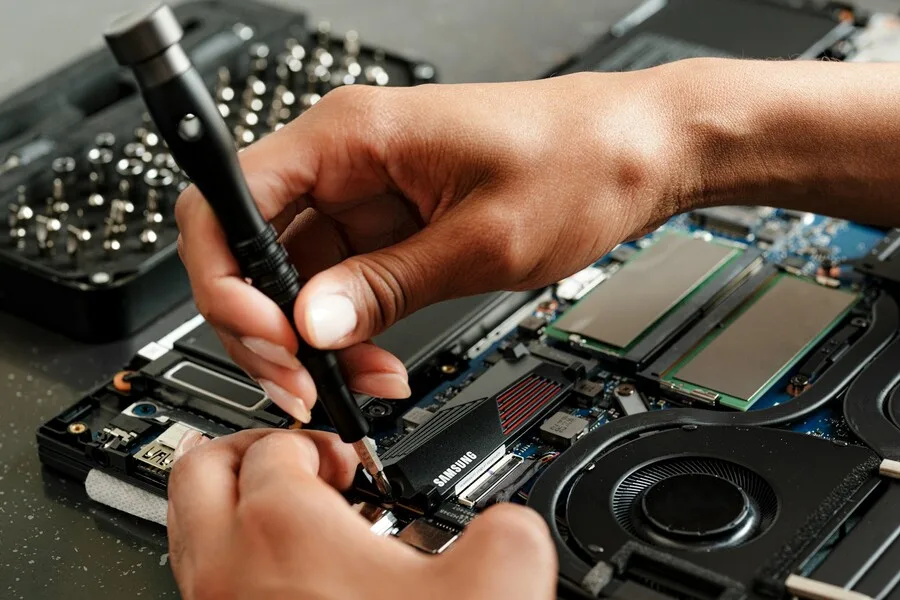
Over the years we have serviced electronics of every kind, one lesson has piled up that you cannot read in any catalogue: faults repeat. However colourful the parade of computers and laptops that comes in, most of them break in the same handful of places. This article is not a borrowed statistic from the internet, it is a view from behind our service counter of what really breaks in computers.
Do not expect precise percentages to the decimal, those would be made up anyway. Instead we will tell you the order as we see it, why it is so and what it means for you. And above all, what you can avoid with a bit of prevention.
Drives: first place, and nobody is glad about it
If we had to name the single thing that comes to us most often and hurts the most, it is drives. Not because they fail unusually often, but because your data lives on the drive. A dead power supply we swap in an hour, a dead drive can mean the loss of memories and documents that money cannot buy back.
Mechanical drives (HDDs) have moving parts and simply run out over time. They often warn you first: clicking, slowing down, the system freezing while copying. That is the last call for an immediate backup. SSDs are tougher, they have nothing to wear out mechanically, but they have another sneaky trait: they can die suddenly and without warning. So the same thing applies to both, and it is the one piece of advice from this whole article to remember even if you forget the rest: keep important data in two places. A drive is a consumable, not a safe.
Power: cheap supplies, damaged adapters, DC jacks
Right behind drives come power problems, and it is a broad group. On desktops the typical culprit is a cheap power supply (PSU) that gives up at the first bigger fluctuation in the mains or after a few years of service. Not rarely it takes something else down with it, which is why skimping on the power supply does not pay.
On laptops it is a different tune. There the main arrivals are battered charging adapters and power connectors (DC jacks), plugged in at an angle for years, tugged by the cable and carried in a bag while connected. The result is a laptop that will not charge or will not turn on. The good news is that this is usually repairable and cheaper than a new machine.
Overheating: dust and dried-out paste
This is a fault that does not announce itself with a failure, but with gradual worsening. The computer becomes loud and hot, slows down under load or shuts itself off. In the vast majority of cases the cause is not broken hardware, but plain dust in the heatsink and thermal paste that has dried out over the years and stopped conducting heat.
It is also the fault that is easiest to prevent. Regular cleaning and repasting turns a machine that is choking back into a quiet and nimble computer. That is exactly why we recommend preventive maintenance before overheating shows up in performance or shortens the life of the other parts.
Laptop batteries: wear, not a fault
The battery is the one part in a laptop we know in advance will wear out. It is a chemical cell and its capacity naturally drops with time and the number of charge cycles. When a laptop lasts an hour instead of a whole day, it is not a fault, it is the normal end of the battery’s life, and it can be replaced.
Plenty of myths circulate about what harms batteries and what helps. We took them apart in a separate article, battery charging myths; here we will just sum up that heat and constantly sitting at 100 percent harm a battery most, not ordinary everyday charging.
Connectors, cables and mechanics: what hands wear out
A large group of repairs is not about electronics, but about mechanics. USB ports that have gone wobbly, headphone connectors, damaged laptop lid hinges, worn keys, screens cracked after a drop. These are things that break with use and can often be fixed on their own, without you having to deal with the whole computer.
Spilled keyboards belong here too. If it happens, time and what you do in the first minute decide the outcome: turn it off at once, unplug it and do not power it on. With liquids, a fast and correct first response is often the difference between a cheap repair and a write-off.
What breaks less than people fear
What is interesting is what, on the contrary, comes to us rarely. The processor is one of the most reliable parts of a computer and a genuine failure is rare, even though people suspect it first. The motherboard usually lasts a long time, unless a surge or a spill destroys it. Memory (RAM) occasionally fails and shows up as crashes and blue screens, but it is not the top cause.
And one more important thing: a large part of what people take for a fault is not hardware at all. A slow computer, sudden restarts, freezing, all of that is often software, an infection or just a cluttered system. That is why it pays to diagnose properly first and only then change anything. A new part solves nothing if the problem was not in it.
Seasonality: why summer and autumn do their bit
Over the years we have noticed that faults have their own calendar. In summer the heat that worsens the cooling of a clogged computer combines with storms and surges that threaten power supplies and boards. That is why we wrote a separate guide on how a computer defends against lightning and surges.
After summer and the holidays comes a wave of machines caked in dust that start to overheat as soon as they return to daily use. None of this is chance, these are recurring peaks you can prepare for with prevention at the right time.
What to take away
If we boil fifteen years of experience down to a few sentences: keep your data backed up, because a drive is a consumable. Do not skimp on power and the PSU, and protect the computer against surges. Have it cleaned now and then, before it starts to choke. And when a computer acts up, first find out what is really wrong, because the same symptom can have several causes.
Our click-through diagnostic „What is wrong with my computer?" helps with exactly that: by symptom it shows the most common causes, what to try yourself and an indicative price. And if you would rather not tackle it alone, we are here.
Computer acting up and you don't know why?
We run a no-obligation diagnostic and tell you honestly whether a repair is worth it or another solution makes more sense. For homes and businesses in Liptov.
Get in touchThis article is part of our guide to computer service and maintenance.
Comments and questions 0
We keep the discussion to the point. Ads, links to other services, profanity and personal attacks will not be published. Neither will posts containing other people's personal data.
Frequently asked questions
What breaks most often in computers?
Does an SSD fail less than a mechanical drive?
Why do computers break more in summer?
Do processors fail often?
Is a slow computer a fault?
What can be prevented in a computer?
Need help with IT?
We will take care of your computers, networks and security - for businesses and households in the Liptov region.
Contact us