
M.2 and NVMe drives and keys B, M, B+M: buy the one that fits
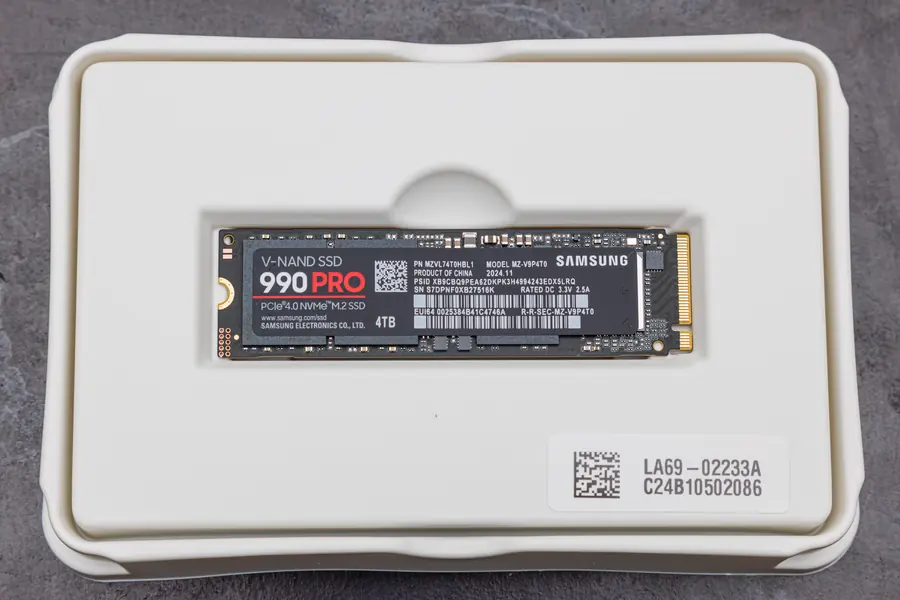
An M.2 drive looks like one small stick, but not every one fits every slot. What decides this is the key, the notch in the connector. If it does not match, you either cannot insert the drive, or it runs slower than you expected. Here is everything you need to buy the right one.
M.2 is a shape, not a speed
First, one important distinction. M.2 is a form factor, that is the physical connector and the board dimensions. It says nothing about how fast the drive runs. Speed is set by the interface the slot uses, which is the topic of our sister article M.2 SATA versus NVMe.
You can tell the size of an M.2 drive from a four-digit code. The first two digits are the width in millimetres (always 22), the rest is the length:
- 2230 and 2242: short, for laptops and small devices
- 2260: medium, less common
- 2280: the most common size for desktops and laptops
- 22110: the longest, for servers and workstations
Before buying, check what length your slot supports. It is most often 2280, but laptops tend to be limited to shorter ones.
The key: the notch that decides
The key is a cut-out in the drive connector (and a matching ridge in the slot). It works as a lock and key at once: it decides what fits the slot and which interface it supports. For storage, three of them matter:
- M key: typically PCIe x4, that is the fastest NVMe drives. The notch sits closer to one edge and leaves a larger continuous row of contacts.
- B key: SATA or the slower PCIe x2. The notch is on the opposite side.
- B+M key: has two notches at once, so it fits both a B and an M slot. It is used mainly by SATA M.2 SSDs and some slower PCIe x2 drives.
This gives a simple logic of compatibility.
What fits what (and how)
This is where things tend to get confused in practice, so three clear rules:
- An NVMe drive with an M key will not go into a pure B slot. The notches do not match, the board simply will not slide in. This is the most common reason a drive “does not fit”.
- A B+M drive (usually SATA) will fit even an M slot. But it runs only at SATA speed, not NVMe. It fits physically, just do not expect NVMe performance.
- The slot on the board always matters too. Some M.2 slots support only SATA, others only NVMe (PCIe), some both. The key on the drive alone does not solve this.
In other words: the key tells you what fits physically, but real speed is decided by the combination of drive and slot.
Watch out: A key and E key are not for drives
A very widespread misconception. In an M.2 slot you may also meet keys A key and E key (or A+E). These are not for storage, but for WiFi and Bluetooth cards. They are smaller and have a different notch. If you see a small M.2 board in a laptop with antenna cables, it is a wireless card, not a drive. Do not try to put an SSD into it, or vice versa.
Quick summary
| Key | What for | Interface |
|---|---|---|
| M key | NVMe SSD (fastest) | PCIe x4 |
| B+M key | SATA M.2 SSD | SATA (fits both slots, SATA speed) |
| B key | SATA or slower PCIe | SATA / PCIe x2 |
| A / E key | WiFi and Bluetooth cards | not storage |
How to buy the right drive
A routine that protects you from a bad purchase:
- Open the motherboard or laptop manual. It states which key, which interface (SATA or PCIe) and which length the slot supports. This is the most reliable source, more in the article on how to choose a motherboard.
- For NVMe speed you need an M key slot and an M key drive. Otherwise you get only SATA performance, even if the drive fits physically.
- Check the length. Most often 2280, but better to verify, especially with a laptop.
When these three things match, the drive fits and runs the way it should.
We will advise and fit it for you
If you are not sure which M.2 drive fits your board or laptop, you do not have to figure it out alone. We will look at your configuration, pick the right drive with the right key, fit it and safely transfer your data and system. Get in touch and we will help.
We will pick and fit the right M.2 drive
We check the key, interface and slot length in your desktop or laptop and safely transfer your data to the new drive. For homes and businesses in Liptov.
Book a drive upgradeThis article is part of our Hardware and components overview.
Frequently asked questions
What is the difference between an M key and a B key on an M.2 drive?
Will an M key NVMe drive fit into a pure B key slot?
Why does an M.2 board in a laptop sometimes have a different notch than a drive?
What size M.2 drive, such as 2280, should I buy?
How do I find out which key and interface my M.2 slot supports?
Does a B+M drive run as fast in an M slot as a pure M key NVMe drive?
Need help with IT?
We will take care of your computers, networks and security - for businesses and households in the Liptov region.
Contact us