
MXM slot: replaceable laptop graphics and everything you can plug into it
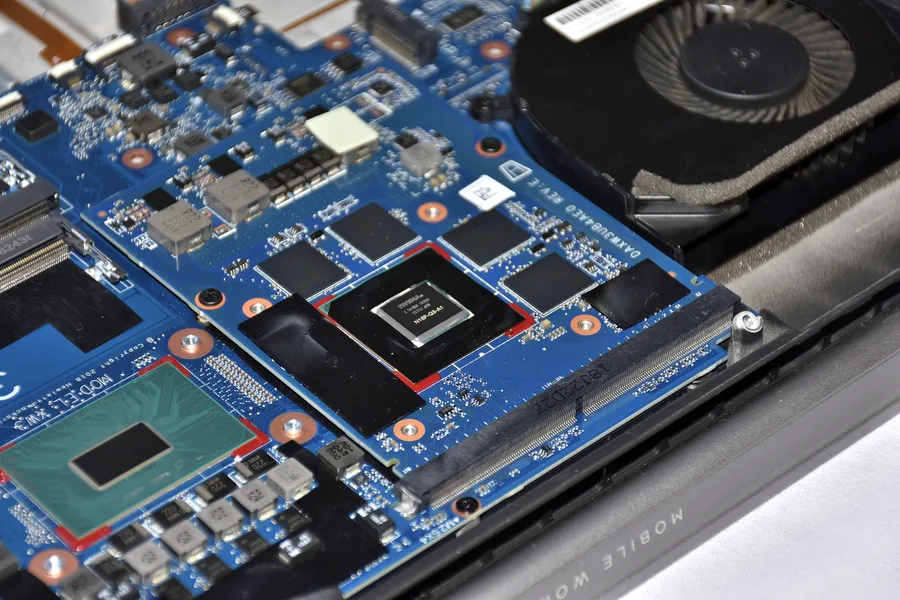
A laptop whose graphics card can be replaced just like in a desktop sounds almost like science fiction today. Yet such a standard has existed for more than twenty years and is still being manufactured. It is called MXM, and although it has disappeared from ordinary laptops, it lives on in workstations, industrial computers, medical equipment and digital signage. In this article we explain what an MXM slot is, which versions and module types exist, what can be plugged into it and what to watch out for if you want to swap the graphics in such a machine.
What MXM is
MXM stands for Mobile PCI Express Module. Nvidia created the standard around 2004 and manufacturers using AMD (then ATI) graphics later joined in. The goal was simple: laptop makers should not have to design a new mainboard for every graphics model. The GPU, its memory and its power circuitry moved onto a separate small board that slides into a connector at an angle, much like a memory module, and is screwed down.
From the computer’s point of view an MXM module is an ordinary graphics card connected over PCI Express x16. Besides the data lanes, the connector carries power, display outputs for the internal panel and external ports, an SMBus link for communication with the BIOS and power-management signals. We covered how the number and generation of PCIe lanes affect performance in PCIe lanes: how count and speed affect the whole build.
One important detail: the module itself has no monitor connectors. HDMI, DisplayPort and the internal display are routed from the module through the connector to the mainboard and only from there to the laptop’s ports. That is why the mainboard has to “know” which outputs the module provides, and why you cannot simply swap a module for any other one.
Versions and module types
Several generations have appeared over the years and they are not mutually compatible:
| Version | Period | Connector | Note |
|---|---|---|---|
| MXM 1.0 to 2.1 | 2004 to 2008 | 230 pins, types I to IV | first laptops with replaceable graphics, historical machines today |
| MXM 3.0 | since 2008 | 285 pins, Type A / Type B | the turning point: new connector, PCIe 2.0, unified power |
| MXM 3.1 | since 2012 | 285 pins, Type A / Type B | same connector as 3.0, higher allowed power, PCIe 3.0 and later 4.0 |
Practically everything you will meet today is MXM 3.0 or 3.1. A 3.1 module usually works in a 3.0 slot and vice versa, provided the power and firmware fit. Older 2.x modules have a different connector and physically do not fit into newer slots.
Within version 3.x there are two sizes:
- Type A: 82 × 70 mm, meant for economical graphics with lower power draw (roughly up to 55 W). Typical for thinner laptops and compact embedded devices.
- Type B: 82 × 105 mm, a longer module with more room for memory and power circuitry. It handles powerful chips with a high TDP, over 100 W in revision 3.1. Gaming laptops and mobile workstations used it.
The connector is the same for both, so a Type A module fits into a Type B slot (it is just screwed down differently and the heatsink must match). The reverse is impossible, the longer module does not fit into the smaller space.
Where MXM is used
Gaming laptops and mobile workstations (roughly 2005 to 2021). MXM was used by Clevo laptops (sold under the Sager, Schenker, Eurocom and other brands), older Alienware M17x and M18x, MSI GT gaming series, Dell Precision M6x00 and HP ZBook 17 mobile workstations. The last big gaming machines with MXM appeared around 2021, for example the Clevo X170 with a replaceable RTX 3080. Since then manufacturers have switched to graphics soldered directly onto the board: it is cheaper, thinner and easier to cool. If you are choosing a gaming machine, see our article Gaming laptop: what to look for.
All-in-one computers. Some desktop all-in-one machines also had replaceable graphics in MXM form, a well-known example being the Apple iMac from 2009 to 2011.
Industry, medicine, digital signage, embedded. This is where MXM is fully alive today. Makers of industrial boards (Advantech, ADLINK, Aetina, Innodisk, congatec and others) need graphics that will be produced and supplied for 5 to 10 years and that can be replaced in the field without replacing the whole device. That is why there are modules with professional Nvidia RTX A500 to A4500 Embedded chips, older Quadro and AMD Radeon E-series in MXM form. You will find them in ultrasound machines, large information displays, gaming machines, robots, transport systems or in edge servers processing camera footage.
Everything you can plug into an MXM slot
MXM is first and foremost a graphics slot, but because it is essentially PCIe x16 with power brought out, other peripherals have appeared as well.
1. Graphics modules
The heart of the whole idea. They fall into three groups:
- consumer GeForce GTX and RTX (mobile versions) and AMD Radeon RX, used in gaming laptops;
- professional Quadro and RTX A-series for CAD, 3D and compute in mobile workstations;
- embedded versions of professional chips with long availability and an extended temperature range for industry.
We covered how to choose graphics performance for your use in How to choose a graphics card; the principles are the same for mobile chips.
2. MXM to M.2 NVMe adapter
The most practical “other” accessory. If a laptop has two MXM slots (SLI machines) or you have removed the graphics and use only the integrated GPU, an adapter turns the unused slot into a full M.2 slot for an NVMe SSD with four PCIe lanes. The same principle, only in the opposite direction, as we described with OcuLink: PCIe is PCIe, no matter which connector carries it. Note that the laptop BIOS must support booting from such a drive, otherwise it will serve only as data storage.
3. MXM to PCIe x16 adapter
The opposite direction: a board with an MXM slot and an edge connector for a regular desktop PCIe slot. It lets you run a laptop GPU in a desktop PC, which repair shops use to diagnose modules and enthusiasts use for cheap builds from retired industrial graphics. The adapter has to handle power (the module expects different voltages than a PCIe slot) and cooling, which you must add yourself because the module has no heatsink.
4. Compute and special modules
In industry the MXM form factor is also used for compute accelerators for artificial intelligence and image processing, where the GPU works as a compute unit without a display attached. Occasional modules with FPGAs or capture circuitry have appeared as well, but these are custom solutions for specific devices, not something you buy in an ordinary shop.
What to watch out for when swapping a module
Replacing graphics in an MXM laptop is far trickier than swapping a card in a desktop. These are the most common pitfalls:
| Problem | Why it happens | How to avoid it |
|---|---|---|
| BIOS | laptops keep a list of supported graphics (whitelist) and reject foreign ones | stick to modules verified for the model, or a community-modified BIOS (at your own risk) |
| vBIOS | module firmware from another laptop may have the display outputs configured differently | a module made for the same brand or a verified combination |
| Power | the laptop has a limited power supply and circuitry sized for the original module | a new module with the same or lower TDP |
| Cooling | chip and memory placement differs between modules, the heatsink may not seat | a heatsink for the specific module, thermal pads of the right thickness |
| Size | Type B does not fit into a Type A slot | check the slot type in the service manual |
| UEFI | an older module without UEFI GOP firmware may show no image at boot | a module with current vBIOS, or legacy mode |
Add the price on top: used MXM modules with powerful graphics often cost more than a comparable desktop card because they are scarce. That is why a swap makes sense mainly for mobile workstations, where the manufacturer publishes a verified list of compatible modules, or for industrial devices where the manufacturer directly offers a newer module generation.
After a swap always watch the temperatures; pads and paste often get damaged when the heatsink is moved. We described how in How to monitor CPU and GPU temperatures.
MXM versus external graphics
If you need more graphics power for an existing laptop, MXM is rarely the best route today. For ordinary laptops without an MXM slot (the vast majority today) an external GPU (eGPU) over Thunderbolt, USB4 or OcuLink is the option. You do not touch the inside of the machine, you pick a powerful card from the desktop range and keep using it when you buy a new laptop. The downsides are a box on the desk and some performance lost on the interface. Details are in OcuLink: the connector that gets graphics out of the computer.
Conclusion
MXM is an elegant idea: a graphics card as a replaceable module that gets PCIe x16, power and outputs through a single connector. In consumer laptops it lost to cheaper soldered graphics, but in industry, medicine and digital signage it is still the standard, precisely because of long availability and serviceability. Besides graphics, the slot accepts adapters for an NVMe drive or compute modules, and in the opposite direction adapters let you use mobile graphics in a desktop. Swapping a module in a laptop, however, is a job for the experienced: BIOS, power and cooling must all fit, otherwise the machine will not boot or will overheat.
Do you have a laptop or an industrial device with MXM graphics and are thinking about a replacement, repair or upgrade? Get in touch, we will assess whether it makes sense and take care of the swap including cooling.
Graphics replacement, laptop and industrial PC service
Graphics module diagnostics, cooling and thermal pad replacement, upgrade advice or choosing an external GPU. For homes and businesses in the Liptov region.
Get in touchThis article is part of our Hardware and components overview.
Comments and questions 0
We keep the discussion to the point. Ads, links to other services, profanity and personal attacks will not be published. Neither will posts containing other people's personal data.
Frequently asked questions
What is an MXM slot?
What is the difference between MXM Type A and Type B?
Can any graphics card be put into a laptop with an MXM slot?
What else can be plugged into an MXM slot besides graphics?
Do today's laptops still have an MXM slot?
Is a laptop graphics upgrade through MXM worth it?
Need help with IT?
We will take care of your computers, networks and security - for businesses and households in the Liptov region.
Contact us