
New RAM form factors: DDR5, CAMM2, LPCAMM2, CUDIMM and what DDR6 will bring
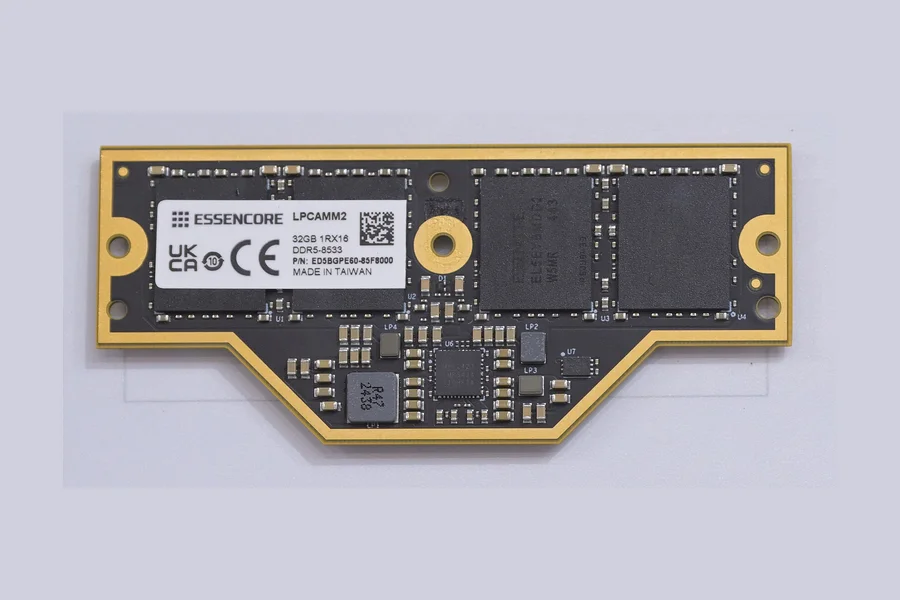
For many years RAM only changed in numbers: DDR2, DDR3, DDR4, bigger capacities, higher frequencies. Physically the module looked the same, an elongated board with an edge of contacts going into a slot. The last two or three years are different. Besides the move to DDR5, the shape of the modules is changing too: laptops are adopting CAMM2 and LPCAMM2, desktops CUDIMM, servers MRDIMM and SOCAMM, and DDR6 is on the horizon. We explain what the acronyms mean, why they appeared and what follows from them when you choose a new computer or want to expand memory in your current one. The basics of capacity and dual-channel configuration are in How to choose RAM; here we go one step further.
Quick glossary
| Format | Where | What is new |
|---|---|---|
| DDR5 DIMM / SO-DIMM | desktops, laptops | new chip generation, power management on the module, two channels per module |
| CUDIMM / CSODIMM | desktops (Intel Core Ultra 200S) | CKD circuit on the module for DDR5-6400 and above |
| CAMM2 | laptops, mini PCs, first desktop boards | flat screwed-down module instead of SO-DIMM |
| LPCAMM2 | thin laptops | replaceable LPDDR5X, previously only soldered |
| SOCAMM | AI servers (Nvidia Grace) | small LPDDR5X module for server processors |
| MRDIMM | servers (Intel Xeon 6, AMD EPYC) | two ranks of chips multiplexed, DDR5-8800 |
| DDR6 | from 2026/2027, servers first | next generation, four times the sub-channels |
DDR5: more than a bigger number
DDR5 has been on the market since 2021 and is now the standard with every new Intel and AMD processor (Ryzen 7000 and newer do not support DDR4 at all). Compared with DDR4 it is not only about speed; the module architecture changes:
- Two independent 32-bit sub-channels per module. A single DDR5 module appears to the processor as two narrower channels. The memory controller uses the bandwidth better and waiting times drop, although a “dual-channel” setup with two modules still delivers more.
- Power management on the module (PMIC). The voltage regulator moved from the motherboard to the memory module. The supply dropped from 1.2 V to 1.1 V and boards became simpler. At the same time the module is more sensitive to quality: a cheap PMIC can limit both overclocking and stability.
- On-die ECC. Each memory chip corrects single-bit errors in its own cells. Note that this is not full ECC memory as in servers: errors on the path between the chip and the processor are still unprotected. Server modules have classic ECC on top.
- Speeds. The JEDEC standard started at DDR5-4800 and commonly ends at 6400 today; overclocked modules (XMP, EXPO) reach 7200 to 8000 MT/s and beyond. The capacity of a single consumer module has grown to 64 GB, so two slots now handle 128 GB.
The practical consequence: DDR4 and DDR5 modules are not interchangeable; the notch in the connector is in a different place. When upgrading, always check the generation in the board documentation, not by looks.
CUDIMM: DDR5 with its own clock circuit
At speeds above 6000 MT/s DDR5 hit a physical problem: the clock signal from the processor arrives at the module too distorted. The solution is CUDIMM (Clocked Unbuffered DIMM) and its laptop version CSODIMM. A small CKD (Clock Driver) circuit was added to the module; it regenerates the clock signal and distributes a clean one to the chips. The result is stable DDR5-6400 in the base mode and above 8000 MT/s when overclocked.
CUDIMMs appeared at the end of 2024 together with Intel Core Ultra 200S processors (socket LGA 1851), which support them natively. Physically they fit the same slot as an ordinary DDR5 DIMM, but on older platforms they will either run only in “bypass” mode at a lower speed, or the board will not boot. Hence the rule: before buying a CUDIMM check the motherboard maker’s qualified vendor list (QVL).
CAMM2: the end of SO-DIMM in laptops
The biggest change in two decades is happening in laptops. The SO-DIMM module you know from every service job (insert at an angle, click down) has two problems at DDR5 speeds: long signal paths through the connector limit the frequency, and two stacked slots take up height that thin laptops do not have. Manufacturers therefore increasingly soldered memory, like graphics, directly onto the board, which removed any possibility of upgrade or repair.
CAMM2 (Compression Attached Memory Module) solves it differently. The module is a flat rectangular board that is laid flat on the mainboard and screwed down; the contacts are not on the edge but on the underside and are pressed against a field of spring contacts on the board. The advantages:
- Thinner profile. One CAMM2 module is lower than a single SO-DIMM slot, let alone two stacked.
- Shorter paths. The signal travels directly, so CAMM2 handles higher speeds than SO-DIMM (DDR5-7500 and above).
- One module, two channels. CAMM2 is 128 bits wide; a single module serves both memory channels, so no pair is needed.
- Replaceability. Memory can be expanded and swapped during service, which soldered memory cannot.
The standard originated at Dell (first-generation CAMM in Precision 7670 workstations in 2022) and JEDEC adopted it as the open CAMM2 standard in 2023. The first desktop boards with a CAMM2 slot were shown by MSI and others in 2024, so far as showcases for enthusiasts; the main battleground is laptops, mini PCs and compact workstations.
LPCAMM2: replaceable LPDDR5X
Thin and efficient laptops do not use DDR5 but LPDDR5X (Low Power). It has a lower voltage, better power consumption and higher speeds (7500 to 8533 MT/s), but it existed only soldered: want more memory, buy a new laptop. LPCAMM2 is the CAMM2 format with LPDDR5X chips. The module measures about 78 × 23 mm, weighs under 10 grams and comes in 16 to 64 GB (larger ones are coming). The first laptop with LPCAMM2 was the Lenovo ThinkPad P1 Gen 7 in 2024; modules are made by Samsung, Micron and others.
Mind an important detail: CAMM2 (DDR5) and LPCAMM2 (LPDDR5X) are not interchangeable. They have a different contact layout and count, even though they look alike. When upgrading, “a CAMM2 module” is not enough; you need exactly the type the device uses.
SOCAMM and MRDIMM: server specialities
Two formats an ordinary user will not meet, but they complete the picture:
- SOCAMM (Small Outline CAMM) is an even smaller LPDDR5X module (about 14 × 90 mm) that Nvidia prepared with Micron, Samsung and SK hynix for the Grace processors in AI servers. It solves the same thing as LPCAMM2 in laptops: efficient memory that can be replaced.
- MRDIMM (Multiplexed Rank DIMM) is a server DDR5 module with two ranks of chips and a special circuit that switches between them so that it delivers double the data flow to the outside. The result is DDR5-8800 while keeping a large capacity; modules range from 64 to 256 GB. The latest generations of Intel Xeon 6 and AMD EPYC processors support it.
DDR6: what comes next
JEDEC is finalising the DDR6 specification and the first products are expected in 2026 to 2027, traditionally in servers first. From what is known: a starting speed around 8800 MT/s with a target of 17,600 MT/s, four narrower 24-bit sub-channels instead of the two 32-bit ones in DDR5 (better parallelism of accesses) and a further voltage reduction. In desktops and laptops DDR5 will remain the main standard at least until 2027, so buying a DDR5 build today is not a dead end.
What it means in practice
Buying a desktop. DDR5 is the clear choice; DDR4 only for the cheapest office builds. Consider CUDIMM only on the Intel Core Ultra 200S platform and only when you really load the memory (video editing, large datasets); for gaming and everyday work a good DDR5-6000 with an XMP/EXPO profile is enough.
Buying a laptop. If you care about being able to expand or repair the memory later, look for SO-DIMM, CAMM2 or LPCAMM2 in the specification. Soldered LPDDR5X is still common in thin machines; in that case buy capacity with headroom, 16 GB is the minimum today, 32 GB a sensible standard for 5 years. More in How to choose a laptop.
Upgrading memory. Find the exact module type (DDR4/DDR5, SO-DIMM/CAMM2/LPCAMM2, speed, and for laptops the maximum supported capacity) from the manufacturer’s documentation or with a tool such as HWiNFO. Mixing modules of different speeds works, but everything runs at the pace of the slower one. If in doubt, ask.
Conclusion
After many years in which memory changed only in numbers, a real change of shape is arriving. DDR5 brought a new module design, CUDIMM pushes it to higher speeds and CAMM2 with LPCAMM2 bring back to thin laptops what we had almost lost: the option to replace and expand memory. DDR6 is on its way but need not concern us for a few more years. When buying, ask not only “how many GB” but also “which format and can it be expanded”.
Do you need to expand the memory in a computer or laptop, or are you unsure which module to buy? Get in touch, we will advise and do the swap, including the new CAMM2 and LPCAMM2 formats.
Memory upgrades and purchase advice
We identify the exact module type your device supports, supply the memory and install it. For homes and businesses in the Liptov region.
Get in touchThis article is part of our Hardware and components overview.
Comments and questions 0
We keep the discussion to the point. Ads, links to other services, profanity and personal attacks will not be published. Neither will posts containing other people's personal data.
Frequently asked questions
What is the main difference between DDR4 and DDR5?
What are CAMM2 and LPCAMM2?
Can an LPCAMM2 module be put into a CAMM2 slot?
What is CUDIMM and do I need it?
When will DDR6 arrive?
Is it worth buying a DDR4 computer today?
Need help with IT?
We will take care of your computers, networks and security - for businesses and households in the Liptov region.
Contact us