
What is Pi-hole and how to block ads across your whole network
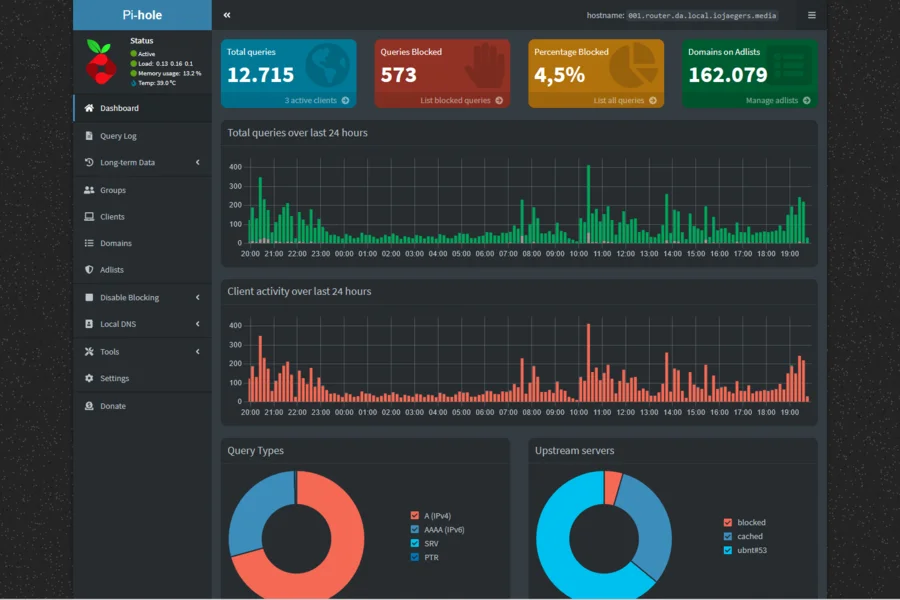
Ads and trackers are everywhere today: on websites, in mobile apps and even on your smart TV. A browser extension (ad blocker) only helps on one device and in one browser. Pi-hole solves the problem differently: it blocks ads for every device on your network at once, without installing anything on your phone or TV. Let us explain how it works and what you need.
What is Pi-hole
Pi-hole is a small program that acts as a DNS server (a domain name resolver) on your network. In simple terms: when a device wants to load a page or an ad, it first asks the DNS server where that domain lives. Pi-hole sits between your devices and the internet and simply does not answer requests for known ad and tracking domains. As a result, the ad never downloads at all. We explain how DNS works in the article what is DNS.
The name comes from the fact that it is usually installed on a Raspberry Pi, a small cheap computer the size of a credit card. It also works on a regular computer, on a home server or in a container.
How Pi-hole blocks ads
Pi-hole uses a technique called a DNS sinkhole. It works on the principle of a blocklist of domains that serve ads and track users:
- A device asks: “where do I find
ad-network.example?” - Pi-hole sees that this domain is on the blocklist and answers that it does not exist.
- The ad does not load and the page is shown without it.
The blocklists update automatically and contain hundreds of thousands of entries. Because blocking happens at the network level, nothing needs to be installed on individual devices. The devices on the network just need to use Pi-hole as their DNS, which is set in one place, usually in the router.
What Pi-hole blocks and what it does not
The big advantage over a browser extension is reach. Pi-hole works even where a regular blocker cannot reach:
- Ads in mobile apps and games.
- Trackers in smart TVs and other IoT devices.
- Ads on all devices at once, including those of your guests.
It also has its limits, which is only fair to mention:
- It does not block YouTube ads well, because they are served from the same domains as the video itself.
- It does not block an ad embedded directly in the content of a page (for example sponsored text), only ads from known ad networks.
- If a device or browser has encrypted DNS (DNS over HTTPS) enabled, it bypasses Pi-hole and the blocking does not apply. More in the article on DNS over HTTPS.
What you need
- An always-on device: ideally a Raspberry Pi (a few watts of power), or an older computer or home server.
- A fixed IP address for that device on the network, so it does not change.
- Access to the router, where you set Pi-hole as the DNS for the whole network.
How to set it up
Briefly, without going into commands:
- Pi-hole is installed on the device (the official installer does it for you).
- Pi-hole gets a fixed IP address on the network.
- In the router you set it to hand out this IP to all devices as the DNS server. That covers the whole household at once.
- Through a clean web dashboard you then see statistics: how many requests went through, what percentage was blocked and which domains are the most active.
What to keep in mind
- A backup: if Pi-hole goes down, it is wise to also set a second (backup) DNS in the router, so the internet keeps working.
- A whitelist: occasionally blocking breaks a login or a feature on a site. You simply add that domain to the whitelist.
- It is not an antivirus: Pi-hole blocks ads and trackers, and partly some malicious domains too, but it does not replace device protection or sensible behavior.
Pi-hole is one of the best ways to make a home network faster, cleaner and more private for a few euros. It also works as simple parental protection when you add lists of unwanted content.
Want to block ads across your whole home or office?
We will deploy Pi-hole, set up the blocklists, whitelist and a backup DNS so everything runs reliably without breaking a thing. For homes and businesses in the Liptov region.
Get Pi-hole set upThis article is part of our Computer networks overview.
Frequently asked questions
What is Pi-hole?
How does Pi-hole block ads across the whole network?
Does Pi-hole block ads in apps and on smart TVs?
Does Pi-hole block YouTube ads?
What do I need to run Pi-hole?
Does Pi-hole replace an antivirus?
Need help with IT?
We will take care of your computers, networks and security - for businesses and households in the Liptov region.
Contact us