
The scam SMS landed in the same thread as the real Apple codes. We took apart what waits behind the link
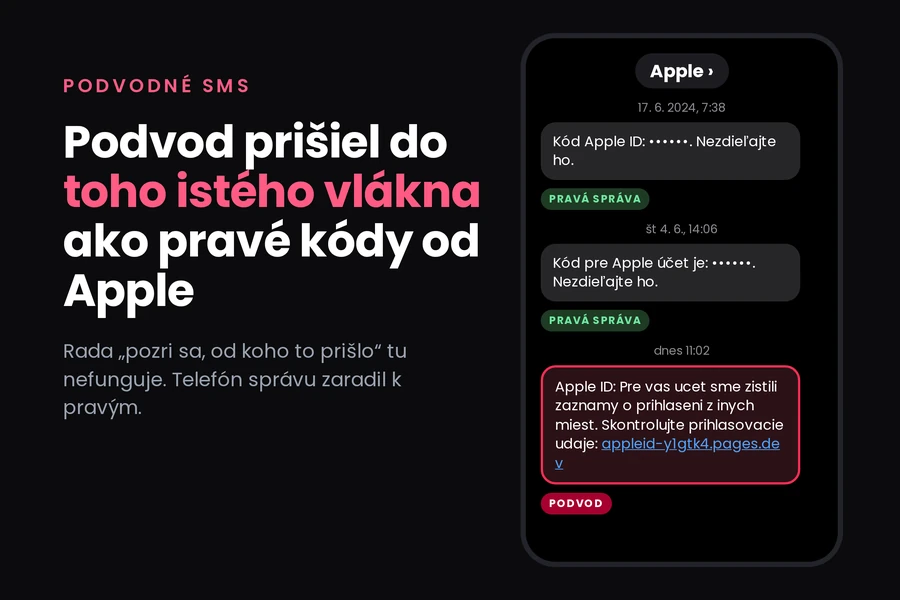
Screenshots and analysis: tiptech.sk, based on a real SMS from 20 October 2026
At 11:02 today an SMS arrived on our company phone saying that someone had accessed an Apple ID account from other locations, with a link to verify the sign-in details. Nothing unusual there, thousands of those go out every day.
What was unusual was where it appeared.
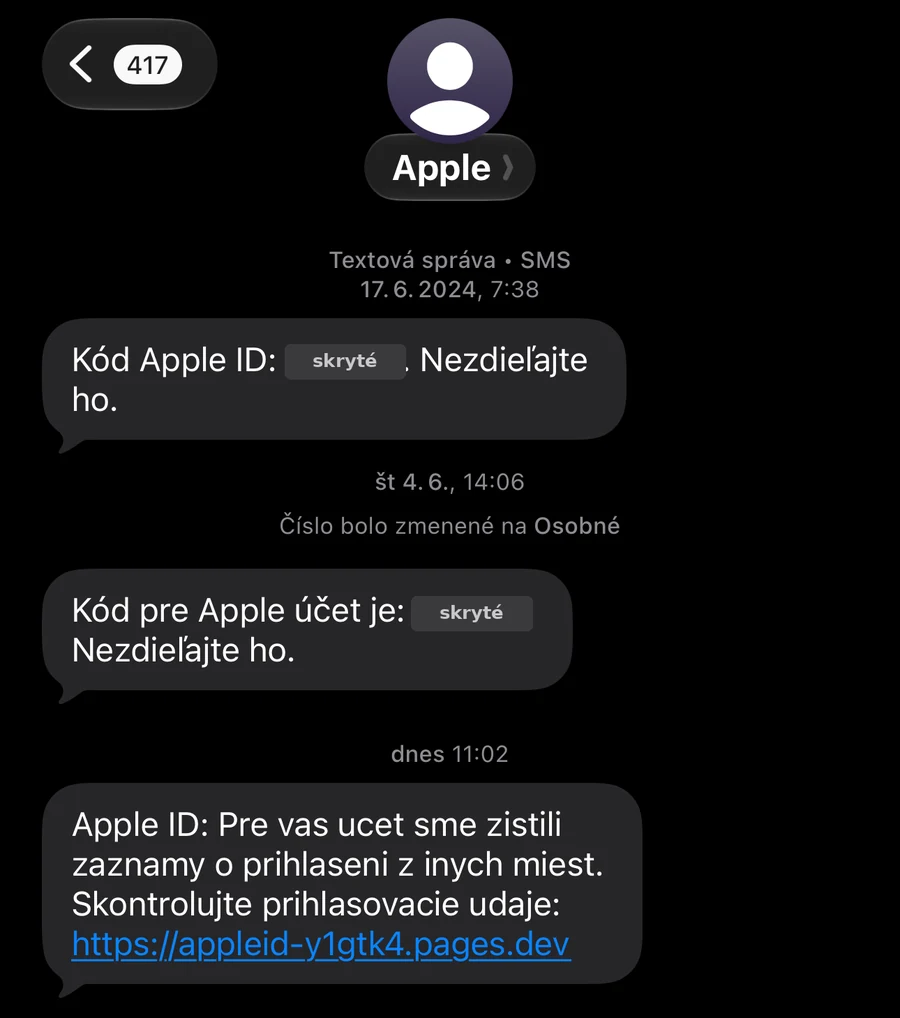
At the top of the thread are two genuine verification codes Apple sent in the past. At the bottom, in the same thread, under the same sender name, sits today’s scam message. The phone filed them together because the sender goes by the same name.
That matters, because the most common advice about scam messages is to check who sent it. Here it gets you nowhere. With bulk SMS the sender name is entered as plain text, and the attacker typed Apple. The phone has no way of telling that this time the same name belongs to somebody else, so it dutifully files the message with the genuine ones.
So we decided to look at what actually sits behind that link. What we found is considerably more elaborate than we expected, and it explains why relying on two-factor authentication is not enough against this kind of scam.
What does not add up in the message
The text itself reads like this:
Apple ID: Pre vas ucet sme zistili zaznamy o prihlaseni z inych miest. Skontrolujte prihlasovacie udaje:
appleid-y1gtk4.pages.dev
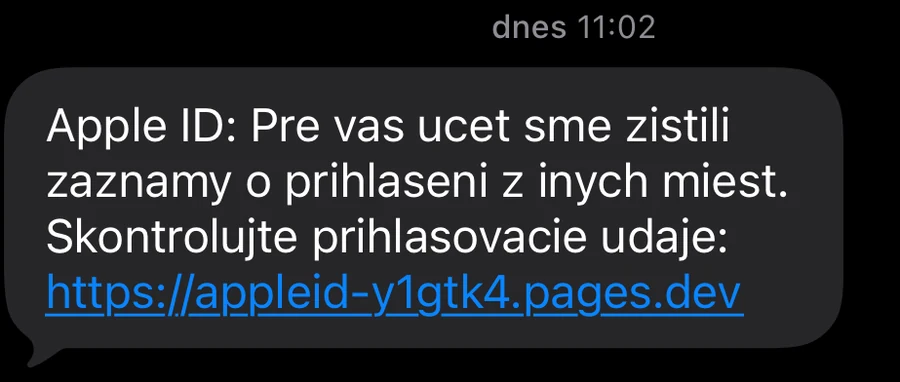
Two things are visible without any investigation at all.
The Slovak accents are missing. The genuine messages above it read “Kód Apple ID: …. Nezdieľajte ho.” with all the diacritics in place. The scam one has none. It is a small thing, but it tends to be the first casualty when messages are blasted out from a foreign system.
The domain is not Apple. The pages.dev suffix belongs to a free site hosting service. Anyone can register an address there in minutes with a random string, exactly like appleid-y1gtk4. Apple runs its sign-in on apple.com and icloud.com, not on somebody else’s hosting. Anything before the first slash that does not end in apple.com is a different site, however many times the word apple appears in it.
On a computer the page does not even show up
The first attempt ended in a surprise. When we opened the address on a computer, the server redirected us to the real icloud.com. No phishing page, just a handover to Apple’s genuine site.
We tried again, this time presenting ourselves as an iOS phone. That time the page loaded.
from a computer  ->  HTTP 302, redirect to https://www.icloud.com
from an iPhone   ->  HTTP 200, the phishing page
This is called cloaking and it is a deliberate safeguard. The automated checks that vet such addresses, and the curious person at a desk, both see an innocent redirect to Apple. The victim holding a phone sees the scam. The page survives far longer than it would if it showed itself to everyone.
A second layer came right behind it. On load, the page hands the browser an arithmetic puzzle that has to be solved before it lets you through. A normal browser does it in a fraction of a second and the visitor never notices, while a simple link-checking robot never gets past it. We solved it and reached the page itself.
A copy of the Apple account sign-in
Behind the gate is a faithful imitation of Apple’s sign-in page. It asks for an email address or phone number and a password, and it has the remember-me option and a forgotten password link. At the bottom sits a copied Apple footer, privacy policy and terms of use links included.
The fidelity is no accident. The page pulls its images, fonts and part of its code straight from Apple’s own servers, specifically from appleid.cdn-apple.com. This is not a picture of a sign-in window but a working copy using the original graphics.
One detail slipped out of it. The page title, the text shown in the browser tab, is in Chinese and translates as “Recover your Apple account”. The comments in the source code are in Chinese too, and we counted more than five thousand characters of them. This is a ready-made kit somebody wrote and distributes, not a one-off page thrown together by hand.
What happens after you enter the password
This is where it gets interesting. The source code spells out the entire script meant to play out with the victim, the individual steps included, along with when each one appears.
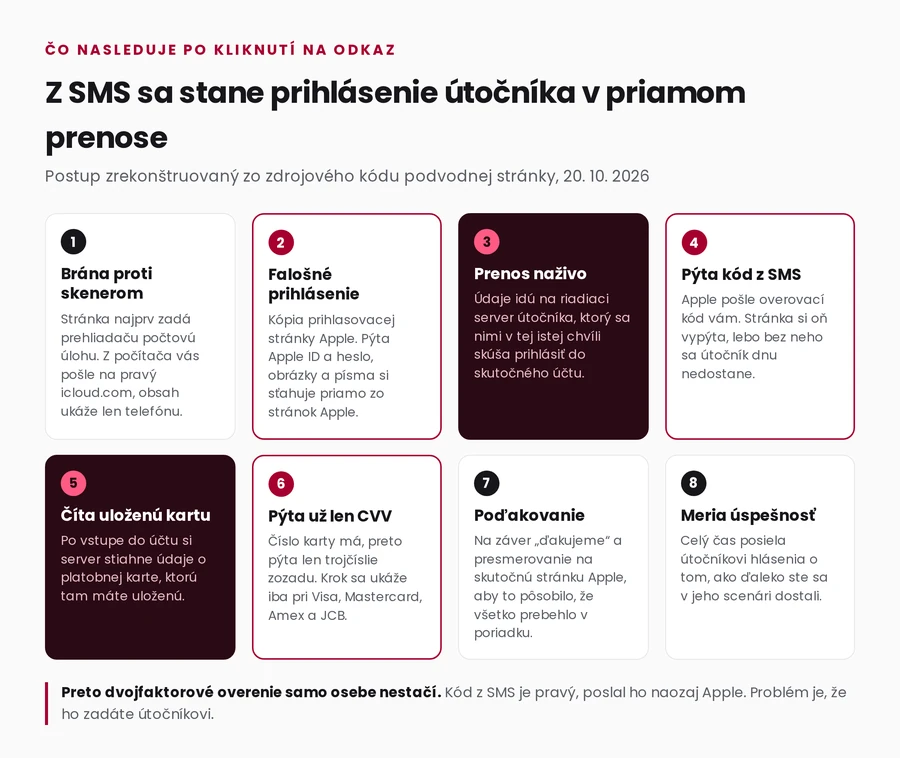
The important part is that the page does not collect passwords into a file for somebody to read later. It sends the details to a control server that immediately tries to sign in to the real account with them. The page then asks for whatever the attacker is missing at that moment and waits to be told what comes next.
That is why it contains a step for the SMS verification code. When the attacker attempts the sign-in, Apple sends the code to you, entirely genuine. The page asks for it straight away, you type it in believing you are confirming your own sign-in, and the attacker is inside the account.
This is the point worth saying out loud: two-factor authentication on its own will not save you here. Nobody broke the code or stole it from the phone. You received it and voluntarily retyped it onto somebody else’s page. The protection against this is a passkey or a physical security key, because those are tied to Apple’s real address and simply do not work on a phishing page.
Then comes the question about your card
The nastiest part sits beyond that. The code contains a step called CVV verification, meaning the three digits on the back of a payment card. And there is a note next to it stating exactly when it should appear: only once the server side has pulled the details of the card stored in the account, and only if it is a Visa, Mastercard, American Express or JCB. With any other card, or none at all, the victim goes straight to a thank-you page.
In other words, by that point the attacker already has the card number, having read it from your own account. They are not asking for it. They are asking for the last piece they need to make the card work. And it comes across as a harmless check, given that the card number is apparently already “known”.
At the end there is a thank-you and a redirect to the genuine Apple site. The victim is left with the impression that they verified something and it is all over.
Throughout, the page reports back to the attacker on how far the person got, whether they stayed, and whether the script ran to the end. It has success tracking built in.
What to do if such an SMS reaches you
Do not click, and delete the message. When you want certainty about your account, open your device settings or an Apple page you typed in yourself. Never a link from the message, however reasonable it looks.
Check where checking actually means something. On an iPhone, under your name in the settings, you will find the list of devices signed in to the account. If somebody really did sign in somewhere, that is where you see it, not in an SMS.
Do not let the thread fool you. The fact that the message landed among genuine ones proves nothing. It is only a matching sender name.
If you have already entered your password, do this, in this order:
- Change your Apple ID password directly in your device settings. If you cannot, because you have already been locked out, use Apple’s account recovery page that you open yourself.
- Go through the list of signed-in devices and sign out everything you do not recognise.
- Check the trusted phone numbers in your two-factor settings. Attackers add their own there so that codes keep reaching them even after a password change.
- Look at the cards in Apple Pay and remove any that should not be there.
- If you also entered the CVV, call your bank and have the card blocked. Do not leave this until morning.
- Consider a passkey instead of a password. Against this kind of attack it is the one thing that reliably works.
And report it. Forward the scam message to Apple at reportphishing@apple.com and report the page to its hosting provider. It takes a minute and shortens the page’s life for everyone else.
Why we are writing this up in such detail
Because this wave is not about carelessness. The message arrived in a trusted thread, the page is a copy of the real one, it loads its graphics directly from Apple, it hides from inspection, and it asks for exactly the details that a genuine verification would plausibly need, in the order it would need them. Someone who falls for this is not foolish. It is built to look right.
The one place where the chain can be reliably broken is right at the start: never sign in through a link that was sent to you. Everything after that is a race against somebody who planned it in advance.
If you want to be able to vet messages like this in general, we cover it in our article on how to spot scam messages, and for Apple specifically we compared a genuine and a fake email in Two emails from “Apple” on the same day.
Somebody at your company clicked and you do not know what is exposed?
We will help establish the scope, secure the accounts and set up sign-in so that a link like this means nothing next time. For homes and businesses in the Liptov region, elsewhere remotely.
Get in touchVerification and sources. This is based on an SMS delivered on 20 October 2026 at 11:02 and on the content of the phishing page, which we downloaded and read the same day. We masked the verification codes in the screenshot even though they expired long ago. The attack sequence is reconstructed from the page’s source code. We did not enter any credentials, so the steps after the password are described as they are programmed, not as we walked through them ourselves. We deliberately print the phishing address without a working link so that it cannot be clicked.
This article is part of the Cybersecurity overview.
Comments and questions 0
We keep the discussion to the point. Ads, links to other services, profanity and personal attacks will not be published. Neither will posts containing other people's personal data.
Frequently asked questions
I got an SMS about an Apple ID sign-in from other locations. Is it real?
How could a scam message end up in the same thread as genuine Apple codes?
Will two-factor authentication protect me if I click such a link?
Why would Apple ask me for my card's CVV?
I clicked the link and entered my password. What should I do?
Why did the page not open on my computer?
Where do I report it?
Need help with IT?
We will take care of your computers, networks and security - for businesses and households in the Liptov region.
Contact us