
An SMS about an unpaid tax fine is a scam. Here is how to spot it
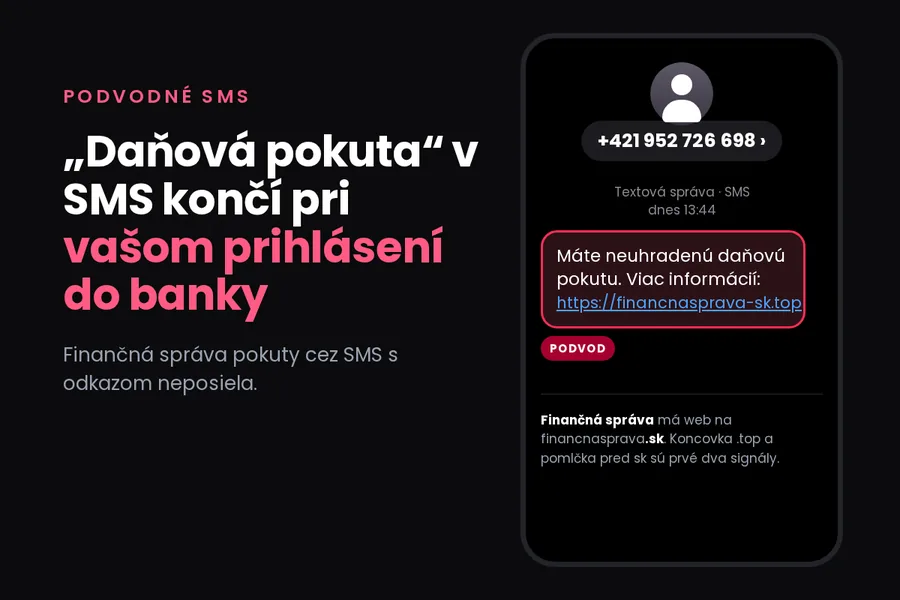
Screenshot: tiptech.sk, based on a real SMS from 26 October 2026
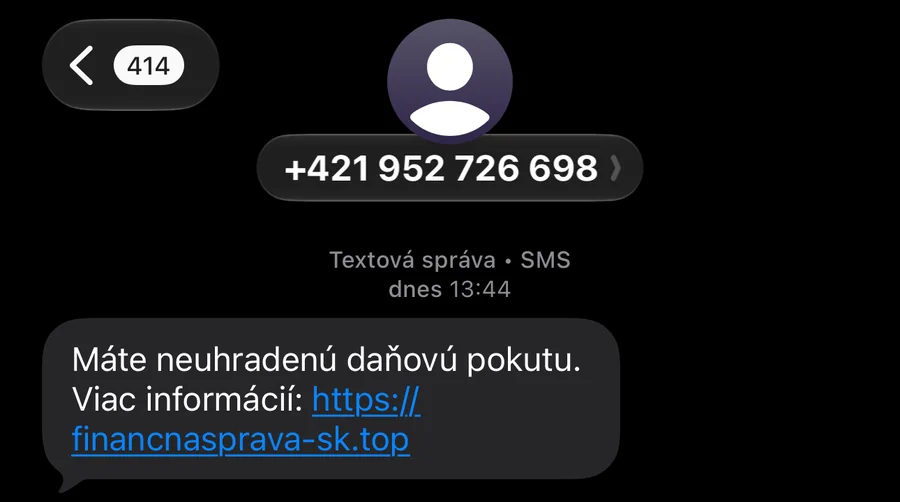
Today at 13:44 we received a short SMS from an ordinary Slovak mobile number. No greeting, no name, just one sentence and a link:
Máte neuhradenú daňovú pokutu. Viac informácií:
financnasprava-sk.top
In English: “You have an unpaid tax fine. More information: …”
It is a scam. Not the kind that wants you to pay a fine, though. Behind the link is a page that is after something more valuable: access to your internet banking.
How to recognise it straight away
The address is not the Financial Administration’s. The real website is financnasprava.sk. The SMS says financnasprava-sk.top. The hyphen before “sk” and the .top ending mean it is a completely different domain that anyone could register. This one was created on 24 September 2026, a month before the messages started arriving.
The Financial Administration does not communicate this way. It does not announce fines or arrears by SMS with a link. If you have something outstanding, you learn about it through your electronic mailbox on slovensko.sk or by post, with a specific decision number and amount.
There is nothing specific in the message. No amount, no case number, no name. A real official notice would address you and know what it is about. The scam message is written to fit anyone.
It came from an ordinary mobile number. Public institutions do not send notices from random numbers. The number may not even belong to the attacker, since these messages are sent out in bulk.
Why the “fine” ends at your bank
The page pretends to be the Financial Administration and offers a “balance check”. For that it asks for your name, phone number and your bank. The choice is VÚB, Tatra banka, ČSOB and Slovenská sporiteľňa.
This alone should be a warning sign. The tax authority has no reason to know which bank you use, let alone ask you to sign in there. After you pick a bank, an imitation of its login appears. Whoever types in a username and password hands them to the attacker.
The most dangerous part comes last. The attacker signs in to your real bank with your details and the bank sends you a confirmation, for example to the George app or as an SMS code. The page asks you to approve it.
The confirmation is genuine, your bank really sends it. But you are not confirming your own sign-in, you are confirming the attacker’s. People fall for it precisely because everything looks right: a notification came from a bank they know, in an app they use every day.
A rule that reliably works here: if you did not just sign in yourself through the official app or website of your bank, do not approve any confirmation. Not even when a convincing page asks you to.
What to do when such an SMS arrives
- Do not click the link and delete the message. If you are not sure whether you owe anything, sign in to your mailbox on slovensko.sk or call the Financial Administration on the number from its official website.
- Sign in to your bank only through its app or an address you type yourself. Never through a link from a message.
- Warn the people around you. Older people, who are naturally scared of a fine from the state, pay for this type of scam most often.
If you already clicked and entered your details
Act now, not tomorrow morning:
- Call your bank. The number is on the back of your card or in the app. Say you entered your details on a scam page and have your internet banking access and your card blocked.
- Change your internet banking password once the bank restores access. If you used the same password elsewhere, change it everywhere.
- Go through the transactions on your account and look for payments you did not make, new payees or changed limits.
- File a report with the police. The bank often needs it when you dispute unauthorised payments.
Not the first scam in the name of the tax authority
In August we looked at a scam e-mail about a tax refund that lured people with an overpayment. This is the other side of the same coin: instead of money you are supposed to receive, a fine you are supposed to pay. The goal is the same in both cases.
The SMS in the name of Apple worked in a similar way, where the attacker also needed you to hand over a genuine verification code. We summarise the general signs of scam messages in how to recognise scam messages.
Someone in your family or company clicked and you do not know what to do next?
We will help check accounts and devices and set them up so that a similar message does no harm next time. For households and businesses in Liptov, remotely elsewhere.
Get in touchVerification and sources. We worked from an SMS delivered on 26 October 2026 at 13:44. We checked the domain details in the public domain registry and certificate records. We did not enter anything on the scam page. We give the address without a working link on purpose, so that it cannot be clicked.
This article is part of the Cybersecurity overview.
Comments and questions 0
We keep the discussion to the point. Ads, links to other services, profanity and personal attacks will not be published. Neither will posts containing other people's personal data.
Frequently asked questions
I got an SMS saying I have an unpaid tax fine. Is it real?
How can I tell the link does not lead to the Financial Administration?
Why does a page about a tax fine want my bank login?
My bank sent a confirmation to its app. Does that mean everything is fine?
I clicked and entered my bank details. What should I do?
Where should I report the scam SMS?
Need help with IT?
We will take care of your computers, networks and security - for businesses and households in the Liptov region.
Contact us