
VRM overheating: when the board's power stage cooks and the PC slows down
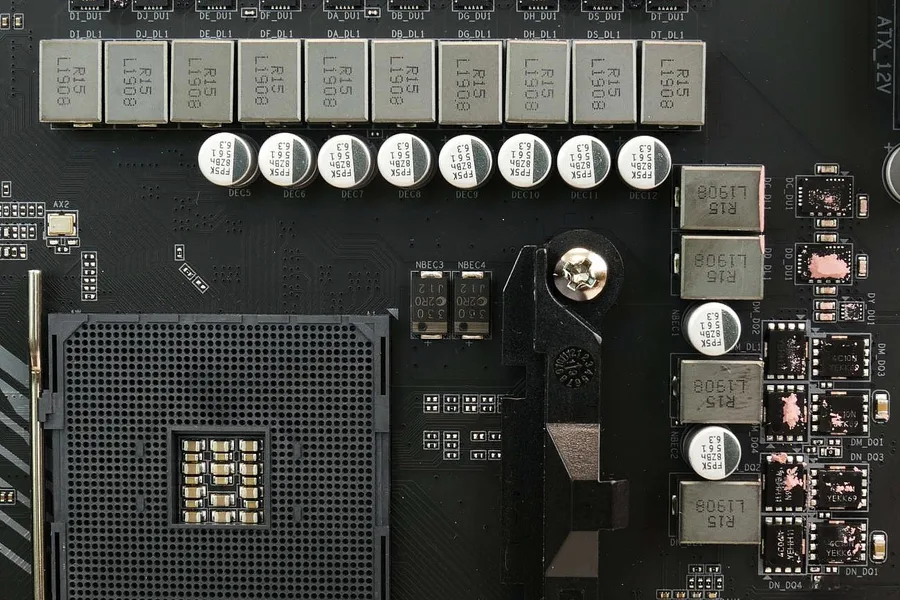
When the computer suddenly slows down after a few minutes of gaming or rendering, the first suspect is the CPU or the graphics card. Sometimes, though, the culprit sits just next to them: the motherboard’s power stage, the so called VRM. It is an unremarkable row of parts around the CPU that only makes itself known when it overheats. And when it does, it can drag down the performance of the whole system even though the CPU temperatures look perfectly fine.
What the VRM is and why it heats up
The VRM (Voltage Regulator Module) is a power converter right on the motherboard. Its job is simple to describe and hard to do: take the 12 volts from the power supply and turn them into the low, very precise voltage around one volt that the CPU needs. It does this through several so called phases, each with its own transistors (MOSFETs), a coil and capacitors.
The catch is the current. The voltage drops, but the power has to stay the same, so the current rises to tens or over a hundred amperes. Part of that energy turns into heat right inside the transistors. The more powerful the CPU and the higher the load, the more heat the power stage makes. That is why better boards have chunky aluminium heatsinks over this area, and why the cheapest boards are not recommended for a strong CPU.
How overheating shows up
An overheating VRM rarely announces itself with an error message. It gives itself away through symptoms that people often mistake for a CPU or memory fault:
- Performance drops after a few minutes of load. The first moments of a test run at full speed, then the clocks suddenly fall and do not recover until the computer cools down.
- Random restarts and shutdowns under load. During gaming or rendering the computer turns off without warning, yet sits idle on the desktop all day.
- The back of the board behind the CPU is hot. Through the opening in the case’s back wall or after removing the side panel, you feel clear heat near the socket.
- Coil whine or buzzing that changes with the load.
- The smell of overheating electronics in extreme cases. Then the computer has to be switched off immediately.
The key difference from a CPU overheating: with a VRM problem the CPU core temperature is usually still fine, and performance falls anyway. That is the clue pointing at the power stage.
How to check it reliably
The best tool is the free HWiNFO. In the sensors section, look for an entry named VRM, VR MOS, MOS or VRM Temperature. Run a stress test and watch how high the temperature climbs and whether CPU throttling kicks in at the same time. Rough bands:
| VRM temperature | What it means |
|---|---|
| up to 60 °C | Calm, no reason to worry. |
| 60 – 90 °C | Normal operation under full load. |
| 90 – 105 °C | The line where you should step in. |
| above 105 °C | Most boards start throttling the CPU, risk of instability. |
Two catches. Not every board has a VRM temperature sensor, cheaper models do not report it at all. And the values differ from model to model, so treat the table as a guide, not a law. When the sensor is missing, a careful touch of the power heatsink after load helps (very briefly, it can burn you), or a thermal camera if you have one at hand.
What to do about it
The good news is that VRM overheating can be solved without replacing the board in most cases. From the simplest to the more involved:
- Improve airflow in the case. The power stage around the CPU has no fan of its own and relies on the air moving around it. A sensible layout of case fans does a lot.
- Add a small fan aimed at the power heatsink. With liquid CPU cooling this is a common rescue, because a liquid cooler no longer blows over the area around the CPU, unlike an air cooler.
- Clean out the dust. A clogged heatsink sheds heat far worse. Compressed air and a moment of time do the job.
- Replace the dried thermal pad between the transistors and the heatsink. After years it hardens and stops carrying heat.
- Lower the CPU power draw. Turning off automatic overclocking or slightly reducing the power limit (PPT/PL) takes away heat with no noticeable loss of performance in everyday work.
- Check whether the board is underbuilt. If you put a powerful CPU on the cheapest board, none of the measures may be enough and a stronger board or a new custom build is the answer.
Keeping an eye on temperatures helps along the way. We covered how in the article on monitoring CPU and GPU temperatures.
When to leave it to a service
When the computer crashes under load, gives off heat or a smell and you cannot settle it on your own, do not push it. Replacing the thermal pad under the power heatsink, checking the power delivery with an instrument and judging whether the board suits the CPU is work a service does reliably. Better than risking that an underbuilt power stage turns into permanent instability over time.
Does your PC slow down under load, restart or give off heat?
We measure the temperatures, assess the motherboard's power delivery and the cooling, and tell you whether a small fix is enough or it is time for a replacement. In person in Liptov, remotely elsewhere.
I want a diagnosisThis article is part of our Hardware and components overview.
Comments and questions 0
We keep the discussion to the point. Ads, links to other services, profanity and personal attacks will not be published. Neither will posts containing other people's personal data.
Frequently asked questions
What is the VRM on a motherboard?
How do I know my VRM is overheating?
What VRM temperature is still safe?
Why does my VRM overheat when the CPU ran fine for years?
Can VRM overheating be fixed without replacing the board?
Can an overheating VRM destroy the CPU or the board?
Need help with IT?
We will take care of your computers, networks and security - for businesses and households in the Liptov region.
Contact us