
“I have access to your camera, pay $1,250”: the extortion email that arrives from your own address
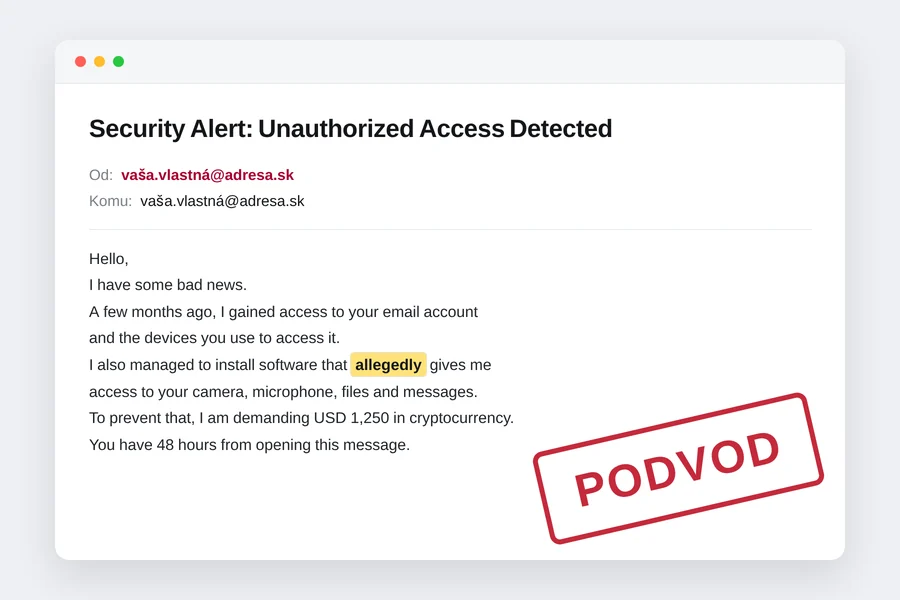
Illustration: tiptech.sk based on a real email from 16 September 2026
On the evening of 16 September, an email with the subject “Security Alert: Unauthorized Access Detected” arrived at one of our business addresses. The sender: the very same address it was delivered to. The content: an unknown “hacker” claims to have been watching the computer, camera and microphone for months, to have compromising recordings, and wants 1,250 dollars in bitcoin within 48 hours. Otherwise everything goes to colleagues and family.
This is one of the most widespread scams of recent years, known as the sextortion scam. It works because the message arrives “from your own address”, which looks like proof. It is not. We will show how it works, what we found in the email headers and why there is no reason to pay or panic.
What the message looks like
Hello, I have some bad news. A few months ago, I gained access to your email account and the devices you use to access it. Since then, I have been monitoring your online activity. I also managed to install software that allegedly gives me access to your camera, microphone, files, messages, browsing history, and other information. (…) To prevent that, I am demanding USD 1,250 in cryptocurrency. (…) You have 48 hours from opening this message. Do not reply to this email, contact anyone about it, or attempt to investigate the source.
Note the word allegedly. The author of the template left it in by mistake, so the extortionist himself admits that the software only allegedly gives him access. It appears twice, the second time near the end: “the information has allegedly already been copied”. That too is a sign of a mass-mailed template.
Trick number 1: the sender is your own address
This is the core of the whole scam. The email protocol dates from 1982 and nobody verifies the “From” field in it. The sending server writes whatever it wants there. It is like an envelope on which you write any name you like as the sender. That is why your address can appear in the email without anyone ever signing in to your mailbox.
The technical term is sender spoofing. SPF, DKIM and DMARC, which we cover below, exist precisely to fight it.
What we found in the headers
Besides the visible text, every email has headers, a kind of routing slip recording the message’s journey. Those are much harder to forge. In this case they speak clearly:
- The real sending computer: the message did not come from our servers or our provider, but from a computer in Rome connected through an Italian ISP. Most likely a stranger’s infected computer in a botnet, sending thousands of such messages without its owner’s knowledge.
- SPF: softfail. The receiving server checked whether this Italian computer is allowed to send mail on behalf of our domain. It is not. Because the domain’s SPF record ended with a soft
~all, the check ended only in a soft fail and the server delivered the message with a note. - DKIM: no signature. Genuine mail from our domain is digitally signed. This message has no signature.
- A Message-ID with a made-up domain
hxcore.ol, which does not exist. Real mail software generates IDs with the server’s domain. - The “To” field contains the display name
upnito1626mu, a random string from the mailing tool. Nobody names a recipient like that. - The bitcoin wallet from the email: two days after delivery it had 0 transactions and a zero balance. Nobody paid, which is good news.
Conclusion: nobody signed in to the mailbox, there is no software on the computer, no recordings exist. It is a mass email sent blind.
Trick number 2: fear and time pressure
The message combines three things that switch off rational thinking: shame (intimate recordings), a threat (we will send it to colleagues and family) and a deadline (48 hours). It adds an order not to tell anyone and not to investigate the source. That is exactly the step that exposes the scam, which is why it forbids it.
Older versions of this scam also included the victim’s real old password, obtained from one of the big data breaches. That looked even more convincing. If you receive that version, it only means your password was in some breach, not that there is a spy on your computer. How to check is in our article has your password leaked?.
What to do when such an email arrives
- Do not pay. The scammer has nothing and will come back after payment, often asking for more.
- Do not reply. A reply confirms the address is live and read by a human. More scams would follow.
- Check your mailbox sign-in history. Gmail has a “Last account activity” link at the bottom right, Microsoft has a “Recent activity” page, other providers have it in the account settings. If there are no foreign devices or countries, nobody signed in.
- Change your password and turn on two-factor authentication if you have not already. Not because the account was breached, but because it is a good opportunity. A password manager helps.
- Mark the message as spam and delete it. The filter learns to catch similar messages.
- If the message contains a real password you still use somewhere, change it everywhere.
If in doubt, paste the whole message source into our phishing email checker. It runs only in your browser and flags the spoofed sender, the threats and the payment demand.
For businesses: why the message got through and how to stop it
This email reached the mailbox because the domain did not have strict sender authentication. Here are the three technologies that stop forged mail:
| Technology | What it does | How it should be set |
|---|---|---|
| SPF | List of servers allowed to send mail on behalf of the domain | End with -all (strict), not ~all |
| DKIM | Digital signature on every sent message | Enabled at the mail provider, key in DNS |
| DMARC | Tells receiving servers what to do with mail that failed SPF and DKIM | p=quarantine or p=reject, not p=none |
With ~all and p=none, a server delivers the forged message and at most flags it. With -all and p=reject, it refuses it before you ever see it. The change is three DNS records, but it has to be done correctly, otherwise you block your own newsletter or invoices from your accounting system. Our detailed guide is in securing business email: SPF, DKIM and DMARC.
A bonus for businesses: when an extortion email lands with an employee who has no idea how spoofing works, it can cause real panic and sometimes a payment from company money. A short team briefing and a clear rule, “report extortion to IT, never pay”, costs less than one such incident.
Why this scam still works
Sending a million emails costs the scammer almost nothing. If one in ten thousand pays, it is profitable. That is why these messages keep coming back in new variants: once with a password from a breach, once with your own address, another time with a Street View photo of your house. The principle is always the same: no proof, big fear, short deadline, cryptocurrency.
We cover similar mechanisms in phishing and scam emails, how to verify a suspicious email and in the case of two emails from Apple, one of which was a scam.
Conclusion
An email “from your own address” threatening to publish recordings is a mass scam. The sender address can be forged, the headers showed a foreign computer in Italy, the message has no signature and not a single specific piece of evidence, and the bitcoin wallet stayed empty. Do not pay, do not reply, check your sign-in history, change your password and turn on two-factor authentication. And if you manage a business domain, set up SPF, DKIM and DMARC so such messages are stopped before they reach the mailbox.
Receiving scam or extortion emails?
We will check the message, review your devices and accounts and set up SPF, DKIM and DMARC for your domain so forged mail does not get through. For homes and businesses.
I want helpThis article is part of our Cyber security overview.
Comments and questions 0
We keep the discussion to the point. Ads, links to other services, profanity and personal attacks will not be published. Neither will posts containing other people's personal data.
Frequently asked questions
I received an email from my own address saying I was hacked. Is it true?
How do I find out whether someone really got into my email?
The extortionist says they have recordings from my camera. Could they?
Should I pay to be left alone?
Why did such an email get through the spam filter?
How do I stop others from sending email in my domain's name?
Need help with IT?
We will take care of your computers, networks and security - for businesses and households in the Liptov region.
Contact us